New in 0.2Hire agents into sandboxes and drive them from the page

Your coding agents, working in a pixel office.

Every session becomes a worker at a desk. A failing test flips the table.

v0.2.0 on npmMITNode 18+no required dependencies

127.0.0.1:4747demo
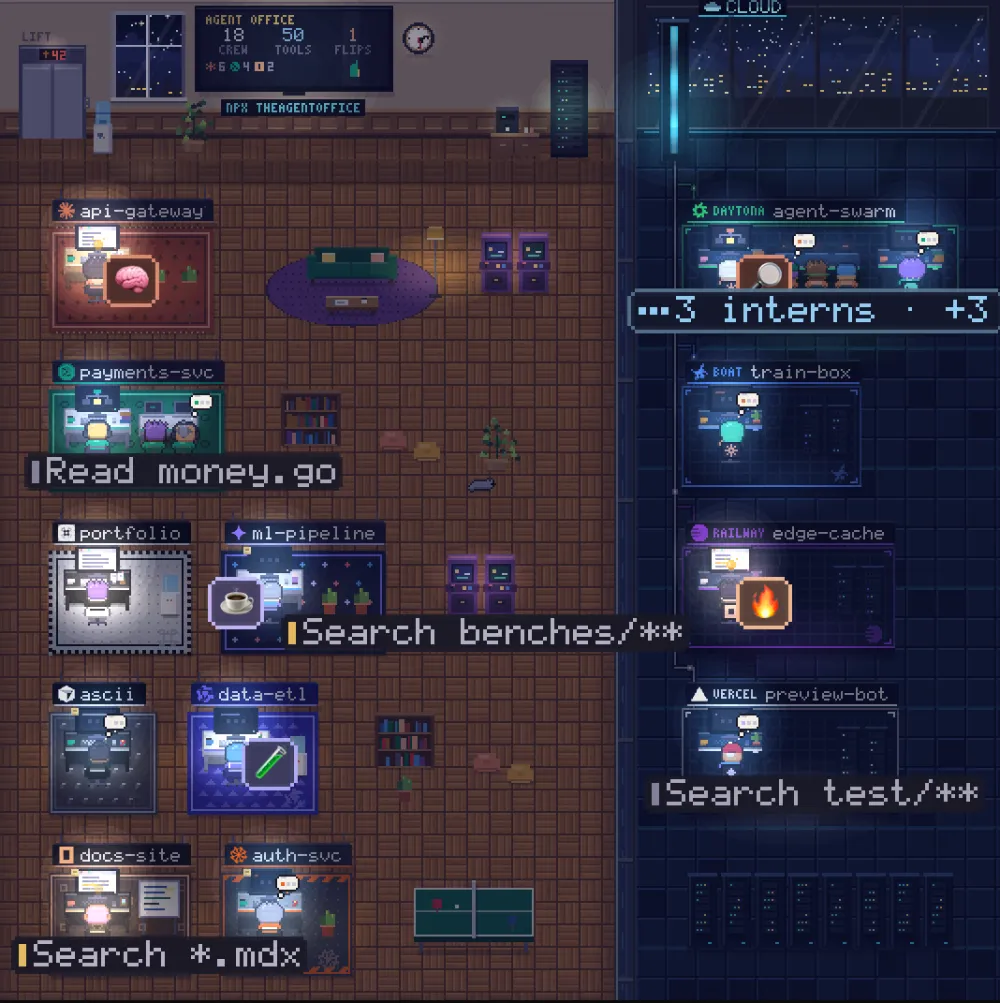
The real office, running its --demo in your browser.

  1. 01

    A session starts.

    A worker walks out of the lift to a desk. Start Claude Code, Codex or any of the eight in a terminal and it walks in; quit it and it walks back to the lift.

    a session started

  2. 02

    It gets to work.

    A paper plane is your prompt. Then a thought bubble, code on the monitor, a terminal, a page scrolling by: thinking, editing, running, reading.

    editing files

  3. 03

    Interns show up.

    A subagent is an intern who walks in from the lift and clocks out when it's done. End the turn while they work and the lead leans back, “supervising 3 interns”.

    subagents were spawned

  4. 04

    It needs you.

    Hand up, a bobbing “!” and the amber needs you: the agent finished and is waiting on you.

    waiting on you

  5. 05

    (╯°□°)╯︵ ┻━┻

    A test command failed. Hit-stop, the camera punches in, the desk lands legs-up. A passing run gets a cheer instead.

    a test command failed

  6. 06

    Some work in the cloud.

    Agents in Daytona, Vercel or Railway sandboxes, or on an ssh box, beam into the glass cloud wing. Nothing is installed on the remote.

    a sandboxed session started

  7. 07

    Your turn.

    or press F anywhere on this page

Watches the agents you already run

  • Claude Code
  • Codex
  • Command Code
  • opencode
  • Cursor
  • Droid
  • Qwen Code
  • Gemini CLI

A wall of terminals doesn't tell you who's stuck, who's waiting on you and who just broke the tests. The office does, at a glance, and it's fun enough to leave open on a second screen.

Control new in 0.2

Hire and drive agents from the page.

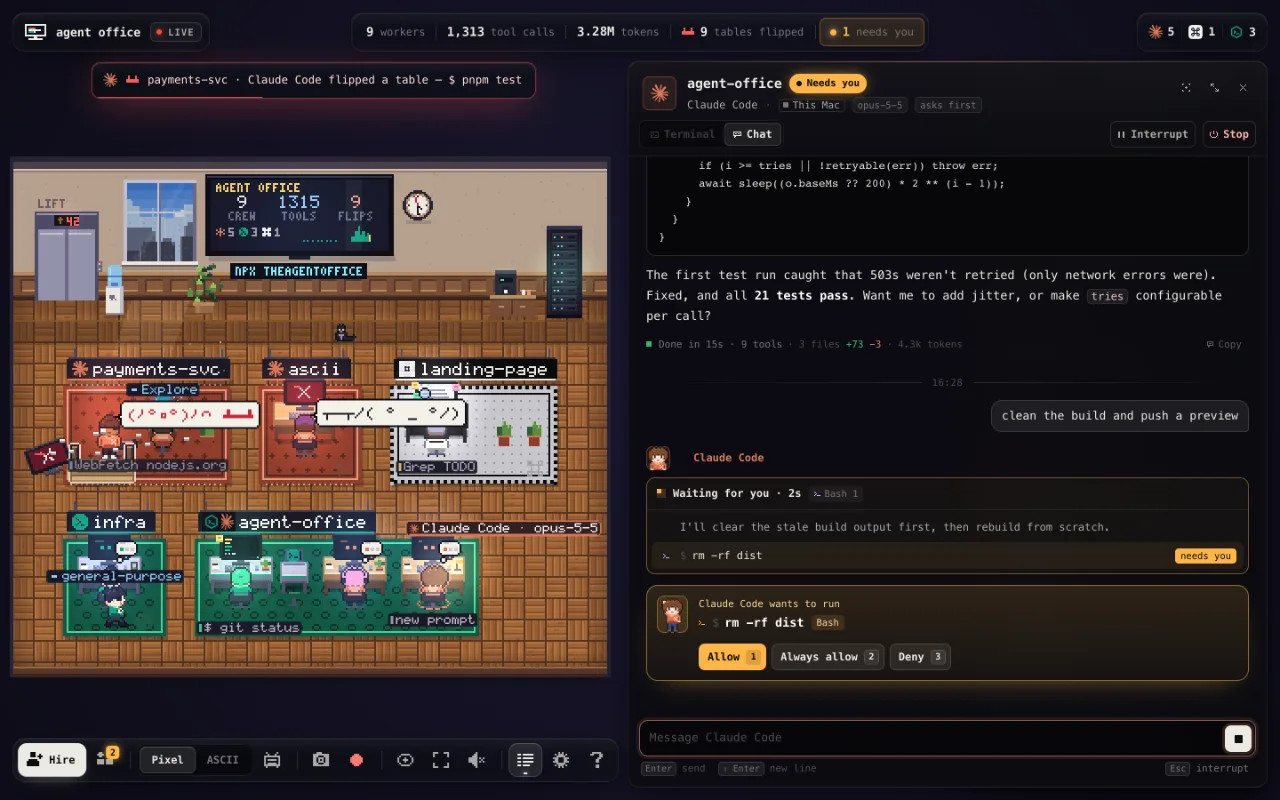
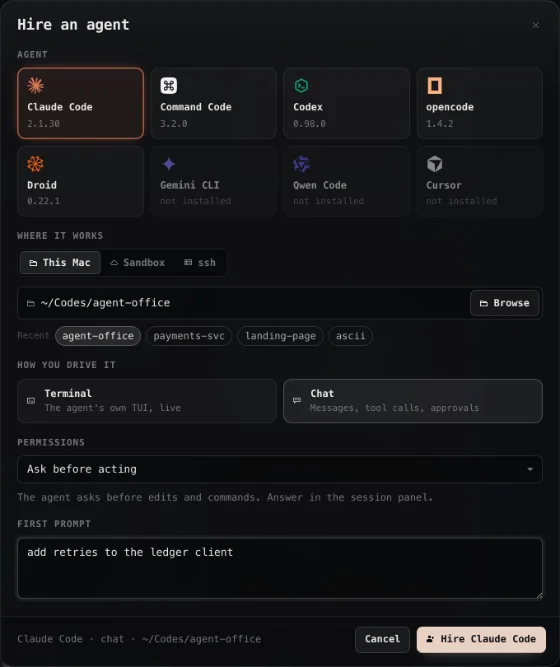
Press Hire, pick an agent, a folder, a sandbox or an ssh box, and a first prompt. A worker walks in, and its desk opens the agent's own TUI in a real terminal, or a chat with approvals as buttons.

The office with a Claude Code session open in chat mode: the agent's replies and tool calls, and an approval to run rm -rf dist with Allow, Always allow and Deny
The Hire dialog: eight agents with their versions, where it works (This Mac, Sandbox, ssh), terminal or chat, a permission mode and a first prompt
  • A real terminal

    The agent's own TUI, live, with a prompt box, Interrupt and Stop.

  • Chat, with approvals

    Replies, tool calls and approvals as buttons, for Claude Code, Codex and opencode.

  • Here, or there

    This Mac, a new or running Daytona, Vercel or Railway sandbox, or an ssh box.

  • Locked by default

    Watching needs nothing. Driving needs a browser unlocked with a one-time link.

More in the office

Built for a second screen, and a stream.

MCP + skill

Agents talk back.

agentoffice mcp is a zero-dependency MCP server with five tools, and a short skill teaches agents when to use them.

live, from the office above
  • office_statusa status and mood over its head
  • office_peerswho else is editing which files
  • office_shouta milestone on the office TV
  • office_celebrateconfetti at its desk
  • office_flipflips its own table

Cloud wing

Sandboxes and ssh boxes, too.

The office reads the transcripts there over plain sh, through the platform's own exec. Nothing is installed on the remote.

live, from the office above
  • Daytona
  • Vercel
  • Railway
  • ssh

Privacy

Labels, not content.

Local by default. Transcripts stay on your machine, and the page shows labels like that one, never prompts, file contents or keys. Keys you pick go only to the agents you hire into sandboxes or ssh boxes. Privacy details

Recording

Clip that.

The office keeps a rolling buffer. Something good just happened? One key saves the last ~15 seconds, with a caption for the moment burned in.

  • Rsave the last ~15 seconds
  • Hstream mode: the camera cuts in on every flip, shout and arrival
  • Sa PNG screenshot
  • Apixel or ASCII

How it works

One command. Nothing to configure.

  1. 01

    Run it

    $ npx theagentoffice
    # or a busy simulated office
    $ npx theagentoffice --demo

    Node 18+. It opens 127.0.0.1:4747.

  2. 02

    Start an agent

    # in another terminal
    $ claude

    It walks in the moment it starts, and back to the lift when it quits.

  3. 03

    Let agents talk back optional

    # MCP server + skill, every agent
    $ npx theagentoffice install

    --dry-run shows the exact diff first; uninstall puts every file back.

FAQ

Questions

Does it send my code anywhere?

No. What reaches the browser is an action and a file name, like “Edit auth.ts” or “$ npm test”. The server binds 127.0.0.1, there is no telemetry and no CDN, and it works offline. The only calls out are to the sandbox platforms and ssh boxes you're logged in to or configured.

Do I have to set anything up?

No. Run npx theagentoffice with Node 18 or newer and start an agent in another terminal. Each agent's transcripts are read from their usual folder.

Which agents does it watch?

Claude Code, Codex, Command Code, opencode, Cursor (cursor-agent), Droid, Qwen Code and Gemini CLI. All but Gemini CLI are tested against real transcripts; Cursor records no tool results, so it can't show a pass or a fail.

Does it touch my agents' files?

Watching is read-only. Only npx theagentoffice install touches configs, when you ask: --dry-run shows the exact diff, every file is backed up first, and uninstall puts them all back.

Is the office on this page real?

Yes. It's the same scene the CLI serves, driven by the same --demo simulator, running in your browser. Nothing on this page reads your agents; every worker here is invented. The small views further down are cut from that same office, live.

What does it cost?

Nothing; it's MIT licensed. Sandboxes you watch or hire bill on your own platform account, as they always do.